
I. Import and installation of TN6 format for premium formulas
1. Click Menu > Formulas > Formula Manager in order, then click “Import Formula”, as shown in the figure below:
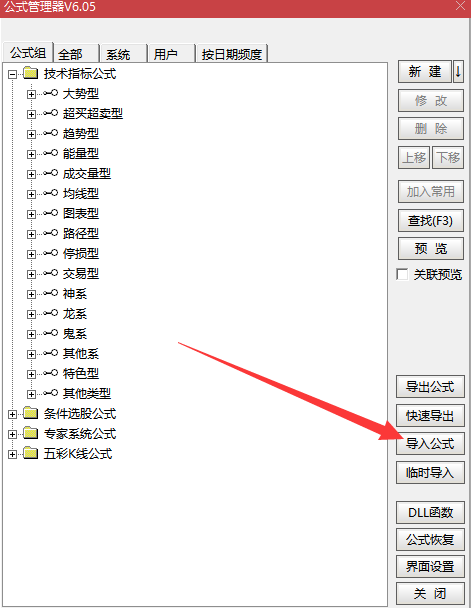
2. In the dialog box that pops up, select the metrics to import and click Open, as shown in the following figure:
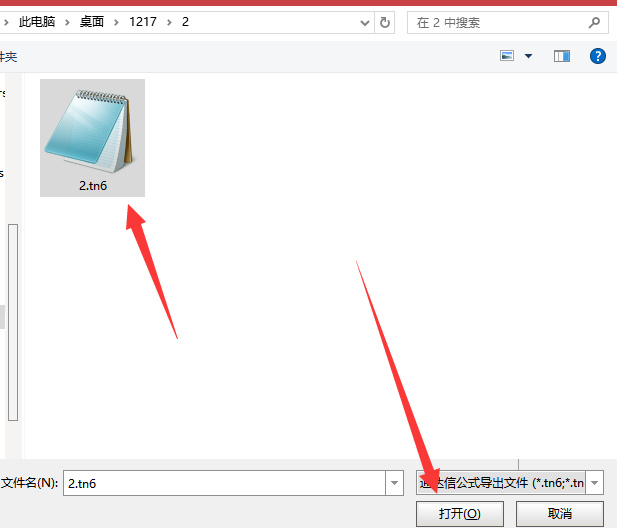
3. In the dialog that pops up, select the indicators you want to import, and then click OK, as shown in the figure below:
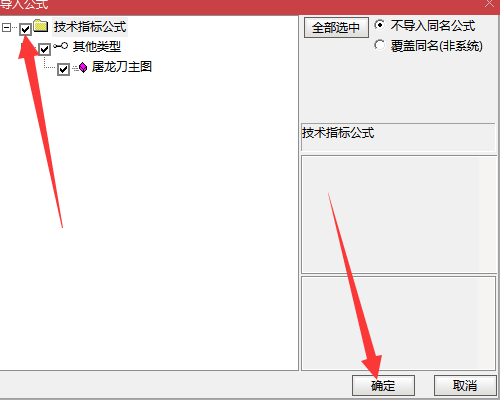
Note: If there are duplicate names, you also need to check the “Overwrite duplicate names (non-system)” option.
II. Download Help
1. Question: Why can't I download it?
Answer: The website does not support your browser, such as Wukong Browser. Please use a different browser.
2. Q: If I've already downloaded it, do I need to pay again when I download it again?
A: If a user has already paid to download a resource, the system will have a record of your payment, and you will not need to pay again for future downloads.
3. Q: Where can I find downloaded documents or resources on my computer?
①, IE browser: (1) In the IE browser, click the settings icon in the upper right corner; (2) Find “View downloads” in the expanded settings menu and click it to see the downloaded files.
② Google Chrome browser: (1) Click the “three vertical dots” icon (Customize and control Google Chrome) in the upper right corner of the browser. (2) Find “Downloads” in the expanded settings menu and click it to see your downloaded files.
③. Apple (Safari) Browser (1) After opening, click the “three dots arranged vertically” icon in the upper right corner; (2) In the expanded menu, find “Downloads” and click to see your downloaded files.
④, 360 Browser: (1) Click the “three lines” icon in the upper right corner of the browser (to open the menu); (2) Find “Downloader” in the expanded settings menu and click it to see your downloaded files.
5. Sogou Browser: (1) Click the “three lines” (menu) button in the upper right corner. (2) In the opened drop-down menu, click to select the “Options” menu item. (3) In the Options window, click the “Downloads” menu item in the left sidebar.
⑥, Win10 Edge browser: (1) Click the “star” icon on the toolbar; (2) Click the “Downloads” tab in the drop-down menu to see downloaded files; (3) If you want to open the download folder, simply click the “Open folder” shortcut link in the upper right corner.
3. Free formula installation
1. Click Function > Formula System > Formula Manager in sequence.
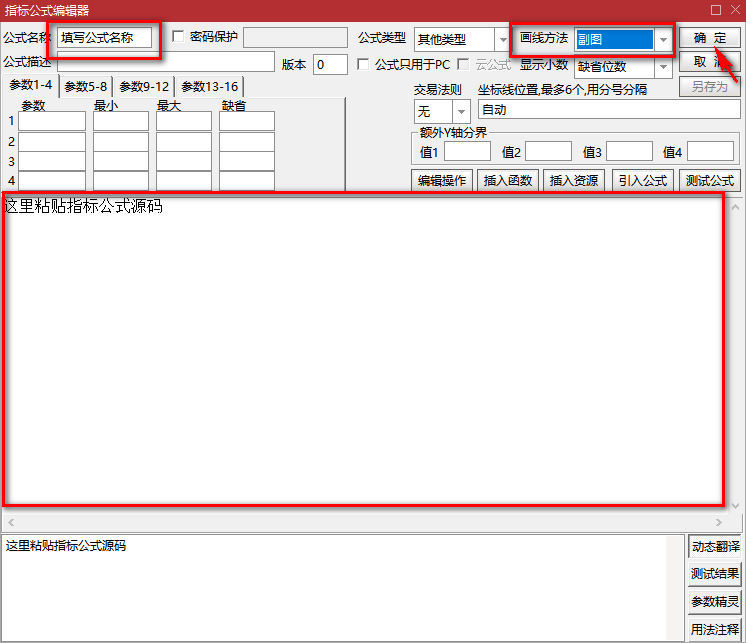
2. Select the corresponding installation directory. Generally, for technical indicator analysis formulas, select “Other Types” in “Technical Indicator Formulas,” then click “New” on the right, as shown in the figure below:
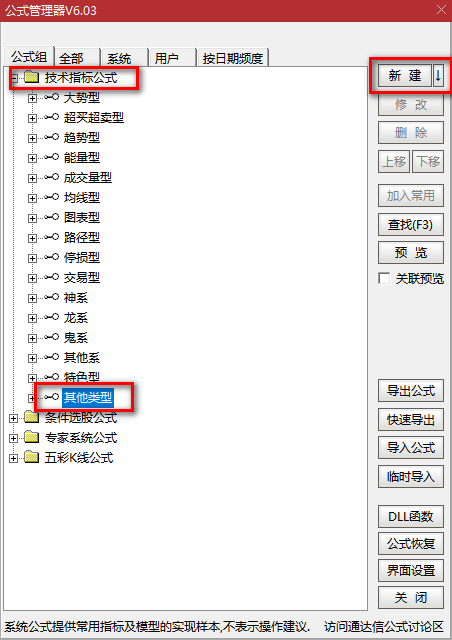
3. Copy the source code into the white box, fill in the formula name, select main chart or secondary chart, click test, and after “Test passed” appears, click OK to complete the creation.
IV. How to use on a mobile phone
After downloading the TN6 format indicator file, open the file, select “Open with another app” -> select Tongdaxin to open -> in the pop-up window, select the “Tongdaxin” app to open the file, and the indicator will be imported.
Attention! If the import is unsuccessful, please send the downloaded formula to WeChat or QQ, and then open it via WeChat or QQ to import it.
5. How to change the sorting metric
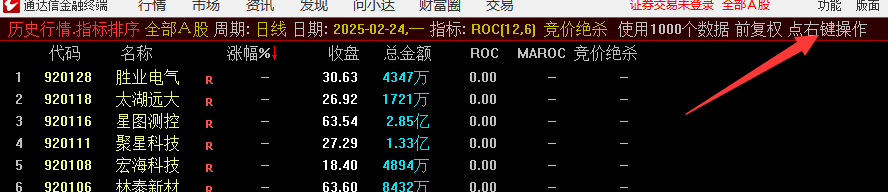
Enter .401 on the keyboard to access the bidding interface, then right-click and select the indicators you need to use, as shown in the image below.
VI. How to replace a time-sharing indicator
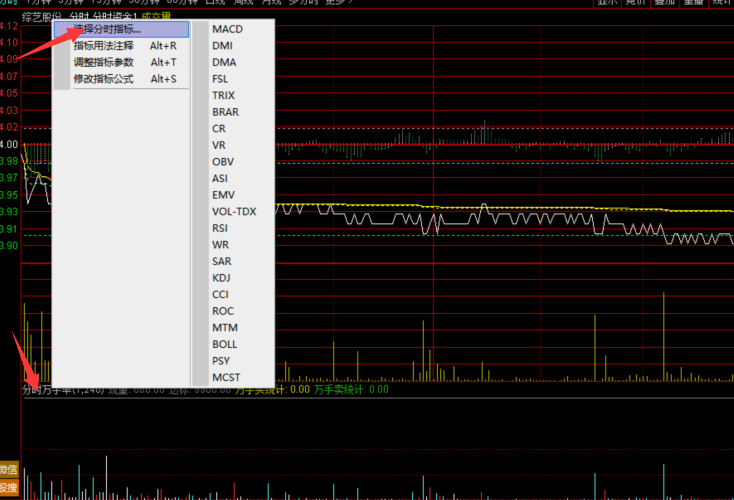
(1) Main Chart Intraday Chart Replacement: Right-click on the main chart, then click -> Intraday Main Chart Indicator -> Select Main Chart Indicator
(2) Replace secondary chart time-sharing: Right-click on the main chart, then click -> Time-sharing Secondary Chart Indicators -> 1 or more secondary chart windows, then select the desired indicator in the secondary chart window, as shown in the figure below.
Seven, are the formulas compatible with both mobile phones and computers?
All indicators can be used on the computer, except for formulas that require the TouZhi L2 market data to be enabled.
Most indicators can be used on mobile phones, but a small number of formulas are not applicable to mobile phones, such as bidding ranking indicators. If a formula is not specifically stated as universally applicable to mobile phones, then a small number of formulas will not be applicable to mobile phones.
8. Unsupported Browsers (Please do not use the following browsers for download)
Wukong Browser